Creating a shirt on Roblox is one of the easiest ways to personalize your avatar and understand how Roblox’s customization system works. Many players start by making a shirt just for fun, while others eventually turn it into a small side income by selling their designs to other players.
The good thing is that you don’t need to be a professional designer to get started. Roblox shirts are made using a fixed template, and once you understand how that template works, the process becomes much simpler than it looks at first glance.
This article explains how Roblox shirts work, how to design one properly using the official template, how uploading works today, and what you should realistically expect if you plan to sell shirts for Robux. This guide will show you how to make a shirt on roblox in the easiest way possible so that anyone can make it from scratch.
Must Read :- How to Change Your Name in Roblox for Free
Contents
- What You Need Before You Start To Make A Shirt
- How to Make a Shirt on Roblox (Step-by-Step)
- Download the Official Roblox Shirt Template
- Open the Template in a Photo Editing Tool
- Designing Your Shirt
- Save the Shirt Correctly
- How to Upload Your Shirt on Roblox
- What Roblox Premium Really Does for Shirt Creators
- Wearing Custom Designs Without Uploading Shirts
- Making Robux by Selling Shirts
- Why Shirts Sometimes Get Rejected
- Is Making Shirts on Roblox Still Worth It?
- Wrapping Up
What You Need Before You Start To Make A Shirt
You don’t need advanced design skills or expensive software to make your first Roblox shirt. Many popular shirts on the platform were created using very basic tools.
Before you begin, make sure you have:
- The official Roblox shirt template
- Any photo editing software (free or paid)
- A Roblox account
- Basic understanding of images, layers, and transparency
If your goal is only to design shirts and experiment, you can do that without spending anything. If your goal is to upload and sell shirts on Roblox, then you’ll also need Roblox Premium, which is explained later in the article.
Also Read :- How to Get Free Robux
How to Make a Shirt on Roblox (Step-by-Step)
The steps below follow the same process used by most Roblox clothing creators today.
Download the Official Roblox Shirt Template
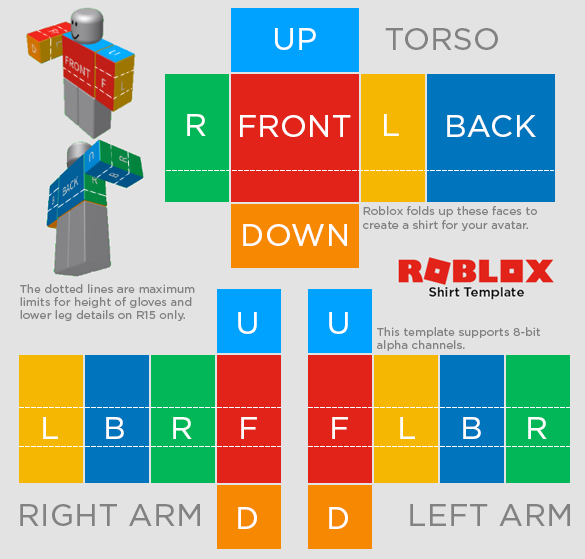
The first step is downloading the official Roblox shirt template. This template defines how your design wraps around the avatar’s torso and arms. This template looks confusing when you first open it because it doesn’t resemble a shirt at all. Instead, it’s a flat layout of different rectangles, each representing a part of the avatar’s body.
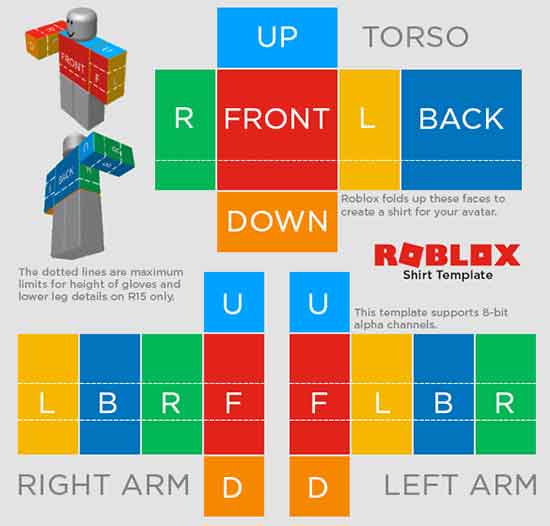
You can download it directly from Roblox here:
https://static.rbxcdn.com/images/Template-Shirts-R15_04202017.png
This template is designed for R15 avatars, which are the default avatar type on Roblox.
Why the official template matters
Many websites claim to offer “updated” or “custom” shirt templates. In most cases, these files either don’t work correctly or cause alignment problems in-game. Using unofficial templates often leads to stretched sleeves, misplaced designs, or broken seams.
For consistent results, always use the official Roblox template. Each section of the official roblox template corresponds to a specific body area: the front of the torso, the back, the sides, and the arms. When Roblox renders your shirt on an avatar, it wraps these sections around the character model. That’s why placement matters more than fancy graphics.
A common beginner mistake is treating the template like a normal image and placing designs randomly. Doing that usually leads to stretched sleeves, broken seams, or designs that don’t line up properly when viewed in 3D.
Open the Template in a Photo Editing Tool
After downloading the template, open it in a photo editing program. Popular options include:
- GIMP (free, Windows and macOS)
- Adobe Photoshop
- Photopea (browser-based)
- Pixlr
Shirt Template Dimensions Explained
Keeping designs within the correct areas helps prevent distortion when the shirt is worn.
Here are the commonly used dimensions:
| Body Part | Size (Pixels) |
|---|---|
| Front & Back of Shirt | 128 × 128 |
| Sides & Arms | 64 × 128 |
| Top & Bottom of Shirt | 128 × 64 |
| Arm Tops & Bottoms | 64 × 64 |
You don’t need to measure every design precisely, but placing important details near the center of each section usually produces the best results.
Designing Your Shirt
Designing a Roblox shirt is less about complex artwork and more about smart placement.
Some useful tips:
- Keep logos and text centered on the torso
- Avoid thin text near seams
- Use layers so you can edit easily
- Start simple before trying complex patterns
Common beginner mistake
Many new creators place important designs too close to the edges of the template. When Roblox wraps the image around the avatar, those details can disappear or look distorted.
Testing simple designs first helps you understand how the template behaves in-game. If you’re unsure what kind of shirts players like, browsing the Roblox catalog can help. This isn’t about copying designs, but about understanding trends, color choices, and styles that players actually wear.
Save the Shirt Correctly
Once your design is complete:
- Save the file as PNG
- Do not resize the canvas
- Avoid flattening layers unless necessary
- Keep transparency intact if used
Your shirt file is now ready for upload.
How to Upload Your Shirt on Roblox
Uploading a shirt is easy, but there is one important requirement.
Roblox Premium Requirement
To upload classic shirts and pants, you must have Roblox Premium. This requirement applies to all users.
Upload Steps
- Log in to roblox.com
- Click Create in the top menu
- Go to Creations
- Select Classic Shirts
- Click Upload
- Choose your PNG file
- Enter a name for your shirt
- Upload and wait for moderation
Approval usually takes a few minutes, but it can take longer during busy periods.
What Roblox Premium Really Does for Shirt Creators
Roblox Premium is often misunderstood. It doesn’t magically make your shirts popular, and it doesn’t guarantee sales. What it does is give you access.
With Premium, you can upload classic clothing, sell items on the marketplace, trade certain assets, and earn Robux from your creations. Without Premium, you can still design shirts, but you won’t be able to upload or monetize them directly.
Many creators design several shirts before buying Premium. This way, once they subscribe, they already have designs ready to upload.
Can You Make or Upload a Shirt Without Roblox Premium?
This question comes up often.
- You can design shirts without Premium
- You cannot upload or sell classic shirts without Premium
Some older methods involving groups exist, but they come with serious limitations:
- You don’t control pricing
- You don’t own the listing
- Earnings go to the group owner
For most users, Premium is the only reliable option.
Wearing Custom Designs Without Uploading Shirts
If your only goal is to customize your avatar and not sell clothing, Roblox offers an alternative in the form of T-shirts. These are essentially decals that can be worn on top of existing outfits.
T-shirts don’t require Premium, but they don’t wrap around the avatar the same way real shirts do. They often look flat and don’t blend well with layered clothing. They’re useful for testing ideas or learning design basics, but they aren’t a replacement for classic shirts.
Making Robux by Selling Shirts
Selling shirts can earn Robux, but results vary.
Success depends on:
- Design originality
- Niche demand
- Pricing strategy
- Visibility
Common mistakes include:
- Pricing too high
- Uploading generic designs
- Expecting instant sales
Most creators improve results by experimenting and learning from feedback.
Why Shirts Sometimes Get Rejected
Occasionally, Roblox will reject a shirt during moderation. This can happen for several reasons, and it doesn’t necessarily mean you did something wrong intentionally.
Common reasons include copyrighted logos, inappropriate imagery, misleading designs, or extremely low-quality uploads. Reviewing Roblox’s community rules before uploading can save you time and frustration.
If a shirt gets rejected, it’s usually better to fix the issue and reupload rather than trying to bypass moderation.
Is Making Shirts on Roblox Still Worth It?
For players who enjoy design and customization, making shirts on Roblox is still worth trying. It’s one of the easiest ways to learn how Roblox’s creator tools work, and it can be genuinely fun.
However, it’s important to have realistic expectations. Shirt creation rewards patience and experimentation. It’s not a quick way to earn Robux, but it can become a steady source of income for those who stick with it and improve their skills over time.
Wrapping Up
Making a shirt on Roblox isn’t complicated once you understand the template and how the upload system works. The hardest part for most beginners is getting comfortable with the template layout and accepting that the first few designs won’t be perfect.
Start simple, experiment, learn from mistakes, and improve gradually. Whether you’re creating shirts just for fun or hoping to sell them someday, the process itself is a good introduction to Roblox’s creative side.